Search by tag: Android
16 articles
How to test Firebase Analytics events in real time
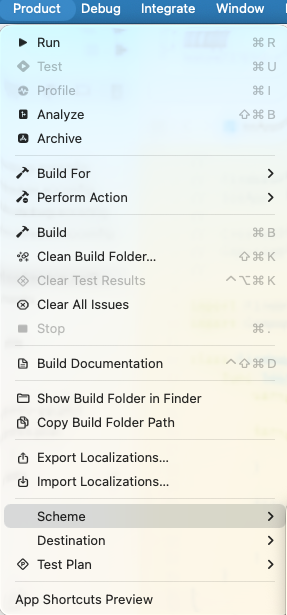
iOS In Xcode, add the argument -FIRAnalyticsDebugEnabled in a scheme: Product => Scheme => Edit Scheme In the new window: Run => Arguments tab => add the argument in Arguments Passed On Launch Android Run the following ADB command in the terminal: Run the app, go to the Firebase Console to see your…

My Simple Account Manager
I built a small utility app with Jetpack Compose to keep my accounts and spending under control. The project served two main purposes: Compose practice – develop a fully functional UI using Jetpack Compose, including a LazyColumn, swipe gestures (left/right) for extra actions, and drag‑and‑drop…

Hair Technique Pro
This is my very first official release of a personal Android app on Google Play, and it’s also my first project built entirely with Jetpack Compose. I began my mobile development career using Java and XML layouts. After spending several years maintaining legacy code, it took some time to become…
Accessing your application database from Android Studio
Open the Terminal window (Alt + F12) or: Then list your devices with the adb command. This will display both running emulators and connected devices: Use the device name to open a connection: To avoid a Permission denied error while trying to access your application files, use the run-as command:…
Accessing your application files from Android Studio
While learning to play with SQLite databases in Android, I wanted to check the .db file generated by my code in the emulator. I was unable to find it directly with the built-in Files application because it doesn't let us see system folders. Fortunately, Android Studio 3+ comes with the Device…